 MvpDots
Liquid Glass & plugins
Optional Hyprland plugins that rebuild themselves after every Hyprland update.
What they add
| Plugin | What you see |
|---|---|
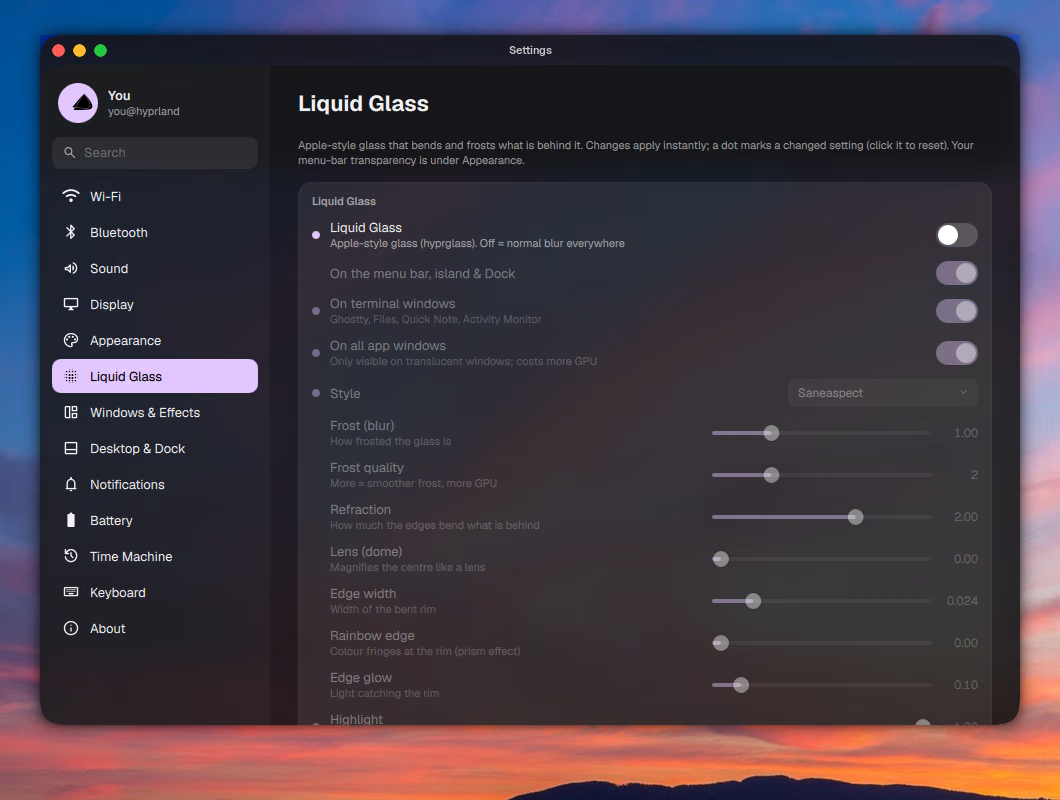
| hyprglass | Apple-style Liquid Glass on the bar, island, dock and screenshot toolbar |
| hyprbars | macOS traffic-light title bars on floating windows |
| dynamic-cursors | shake the pointer to make it big and easy to find |
| hyprfocus | a soft pulse on the window you switch to |
All optional: without them the desktop looks the same, with normal blur instead of glass.
The problem they solve
A Hyprland plugin is compiled code that runs inside Hyprland, so it must be built against the exact Hyprland version that loads it. That is why plugins usually break after an update. MvpDots handles it for you.
How it works
Pick the right version. Every plugin ships a hyprpm.toml that pairs Hyprland releases with the plugin
commit that builds against them, the same data Hyprland's own hyprpm uses:
[repository]
commit_pins = [
    ["918d8340afd652b011b937d29d5eea0be08467f5", "f0409be76564171a97a792deabab3bd0528fe40c"], # v0.41.2
    # … one line per Hyprland release
]
hypr-plugins reads the installed Hyprland's commit and looks it up:
hypr_commit() { hyprland_version | grep -oE 'commit [0-9a-f]{40}' | head -1 | cut -d' ' -f2 || true; }

pin_for() {   # repo dir, hyprland commit → plugin commit (empty = newest)
    python3 - "$1/hyprpm.toml" "$2" <<'PY'
import sys, tomllib
pins = tomllib.load(open(sys.argv[1], "rb")).get("repository", {}).get("commit_pins", [])
print(next((p[1] for p in pins if p[0] == sys.argv[2]), ""))
PY
}
Build without sudo against the headers your distro installed with Hyprland (pkg-config hyprland), into
~/.local/lib/hyprland-plugins/, and remember which Hyprland they were built for.
Rebuild after updates. At every login Hyprland runs hypr-plugins auto. If the installed Hyprland differs from
the one the plugins were built for, it rebuilds them in the background, reloads, and tells you:
-- after a Hyprland update, rebuild the plugins for the new version in the background
hl.on("hyprland.start", function() hl.exec_cmd("hypr-plugins auto") end)
pcall(require, "plugins")
Use it
hypr-plugins status   # Hyprland version, and what the plugins were built for
hypr-plugins build    # build now
hypr-plugins off      # remove them (and stop automatic rebuilds)
hypr-plugins on # build them again:: Building plugins for Hyprland 0.56.2 (efb5099)
:: hyprglass → pinned 7fc3280
:: hyprglass ✓
:: hypr-dynamic-cursors → pinned 5a22428
:: dynamic-cursors ✓
:: hyprland-plugins → pinned 7644cec
:: hyprfocus ✓
:: hyprbars ✓
:: 4 built. They load at the next login, or now with: hyprctl reloadSafety
- Each plugin loads inside
pcall: if Hyprland refuses one (wrong version), it is skipped and logged to~/.local/state/hypr/plugin-errors.log. - Crash guard: for the first 30 seconds after login a marker file exists. If Hyprland crashes in that window,
the next login skips the plugins and tells you.
rm ~/.local/state/hypr/plugins-startingto try again. - Glass is drawn only on the shell's small floating parts, so a still screen costs nothing.
Tune the glass
Settings → Liquid Glass: style (apple, saneaspect, subtle, clear, glass, high contrast), frost, refraction, lens, edge width, rainbow edge, edge glow, highlight, brightness, contrast, saturation, vibrancy, and where it appears.